/* OpenTokenMonitor — landing page (single-file React)
 * Dev-tool brutalist. Mono, dense, single accent.
 */

const { useState, useEffect } = React;

const VERSION = "0.4.1";
const REPO = "https://github.com/Hitheshkaranth/OpenTokenMonitor";
const RELEASES = REPO + "/releases/latest";
const LATEST_API = "https://api.github.com/repos/Hitheshkaranth/OpenTokenMonitor/releases/latest";

/* Release asset names carry the version (OpenTokenMonitor_0.4.1_arm64.dmg),
 * so links are resolved against the latest release at runtime. Until that
 * answers — or if it can't — every link falls back to the releases page. */
const DOWNLOADS = [
  { id: "macos-arm",   os: "macOS",   arch: "Apple Silicon",  ext: ".dmg",      match: /_(arm64|aarch64)\.dmg$/ },
  { id: "macos-intel", os: "macOS",   arch: "Intel",          ext: ".dmg",      match: /_(x86_64|x64)\.dmg$/ },
  { id: "windows",     os: "Windows", arch: "x64 installer",  ext: ".exe",      match: /_x64-setup\.exe$/ },
  { id: "linux-deb",   os: "Linux",   arch: "Debian / Ubuntu",ext: ".deb",      match: /_amd64\.deb$/ },
  { id: "linux-rpm",   os: "Linux",   arch: "Fedora / RHEL",  ext: ".rpm",      match: /\.x86_64\.rpm$/ },
  { id: "linux-app",   os: "Linux",   arch: "AppImage",       ext: ".AppImage", match: /_amd64\.AppImage$/ },
];

const formatSize = bytes =>
  bytes >= 100 * 1048576 ? `${Math.round(bytes / 1048576)} MB` : `${(bytes / 1048576).toFixed(1)} MB`;

/* Latest release: { version, assets: { [download id]: { url, size } } }. */
const useLatestRelease = () => {
  const [release, setRelease] = useState({ version: VERSION, assets: {} });
  useEffect(() => {
    let cancelled = false;
    fetch(LATEST_API, { headers: { Accept: "application/vnd.github+json" } })
      .then(r => (r.ok ? r.json() : Promise.reject(r.status)))
      .then(data => {
        if (cancelled) return;
        const assets = {};
        for (const d of DOWNLOADS) {
          const a = (data.assets || []).find(x => d.match.test(x.name));
          if (a) assets[d.id] = { url: a.browser_download_url, size: a.size };
        }
        setRelease({ version: (data.tag_name || "").replace(/^v/, "") || VERSION, assets });
      })
      .catch(() => {});
    return () => { cancelled = true; };
  }, []);
  return release;
};

const linkFor = (release, id) => release.assets[id]?.url || RELEASES;

const detectOS = () => {
  if (typeof navigator === "undefined") return "macos-arm";
  const p = (navigator.userAgentData?.platform || navigator.platform || "").toLowerCase();
  const ua = navigator.userAgent.toLowerCase();
  if (p.includes("mac") || ua.includes("mac")) return "macos-arm";
  if (p.includes("win") || ua.includes("win")) return "windows";
  if (p.includes("linux") || ua.includes("linux")) return "linux-deb";
  return "macos-arm";
};

const Path = ({ children }) => (
  <code style={{padding:"1px 5px",fontSize:11,color:"var(--ink-1)",background:"var(--bg-1)",borderRadius:3,border:"1px solid var(--line)"}}>{children}</code>
);

/* ============== NAV ============== */
const Nav = ({ version }) => (
  <nav className="nav">
    <div className="wrap nav-row">
      <a href="#top" className="nav-brand" aria-label="OpenTokenMonitor home">
        <img className="nav-mark" src="assets/icon.png" alt="" aria-hidden="true"/>
        <span><b>OpenTokenMonitor</b><span className="v">v{version}</span></span>
      </a>
      <div className="nav-links">
        <a href="#glance">Tray</a>
        <a href="#screens">Product</a>
        <a href="#features">Capabilities</a>
        <a href="#providers">Providers</a>
        <a href="#install">Install</a>
        <a href="#faq">FAQ</a>
      </div>
      <div className="nav-cta">
        <a className="btn btn-ghost" href={REPO} target="_blank" rel="noreferrer">GitHub ↗</a>
        <a className="btn btn-primary" href="#install">Download</a>
      </div>
    </div>
  </nav>
);

/* ============== HERO ============== */
const Hero = ({ os, release }) => {
  const pick = DOWNLOADS.find(d => d.id === os) || DOWNLOADS[0];
  return (
    <header className="hero" id="top">
      <div className="wrap">
        <div className="hero-grid">
          <div>
            <div className="hero-meta">
              <span className="pip"/>v{release.version} · open source · MIT
            </div>
            <h1>
              Know <span className="strike">after</span><br/>
              <em>before</em> you hit the limit.
            </h1>
            <p className="hero-sub">
              Live usage limits, exact per-project costs and time-to-limit alerts
              for Claude Code, Codex and Antigravity — in your menu bar or taskbar,
              computed on your own machine.
            </p>
            <div className="hero-cta">
              <a className="btn btn-primary" href={linkFor(release, pick.id)}>
                Download for {pick.os} <span className="arrow">→</span>
              </a>
              <a className="btn" href="#install">All platforms</a>
              <a className="btn btn-ghost" href={REPO} target="_blank" rel="noreferrer">View source ↗</a>
            </div>
            <div className="hero-fineprint">
              No account · No telemetry · Reads <Path>~/.claude</Path> <Path>~/.codex</Path> and Antigravity's logs
            </div>
          </div>
          <div className="hero-shot">
            <span className="corner tr1"/><span className="corner tr2"/>
            <span className="corner bl1"/><span className="corner bl2"/>
            <span className="corner br1"/><span className="corner br2"/>
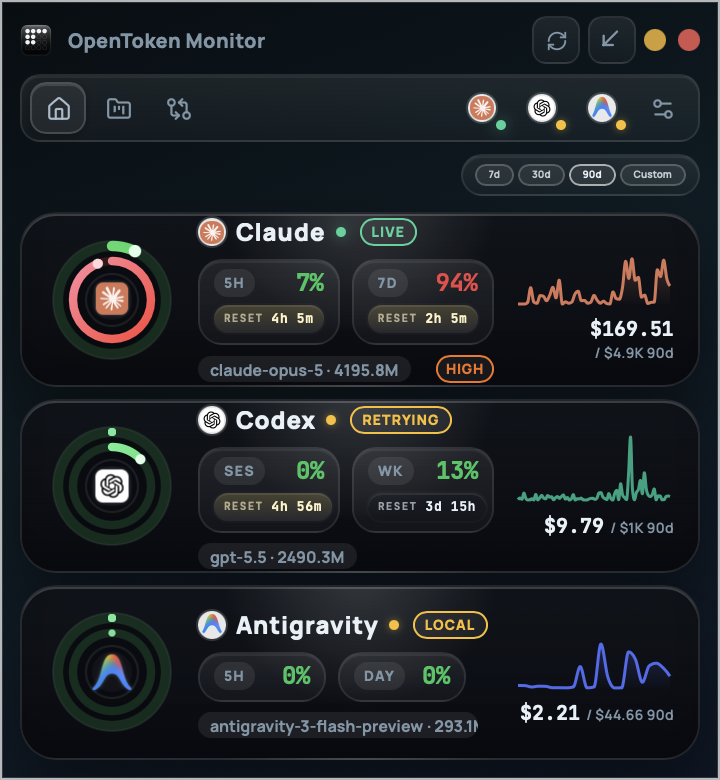
            <img src="images/overview-0.4.0.png" alt="OpenTokenMonitor overview: Claude, Codex and Antigravity usage rings with reset countdowns, spend for the selected period, and cost trends."/>
          </div>
        </div>
      </div>
      <div className="wrap">
        <div className="hero-meter">
          <div className="cell"><div className="k">Providers</div><div className="v">Claude · Codex · Antigravity</div></div>
          <div className="cell"><div className="k">Runs on</div><div className="v">macOS · Windows · Linux</div></div>
          <div className="cell"><div className="k">Data</div><div className="v"><span className="acc">●</span> 100% local</div></div>
          <div className="cell"><div className="k">License</div><div className="v">MIT</div></div>
        </div>
      </div>
    </header>
  );
};

/* ============== PROBLEM ============== */
const Problem = () => (
  <section className="problem">
    <div className="wrap">
      <p className="problem-q">
        You run three coding agents. Each has its own quota window, its own reset timer, its own pricing page — and none of them warns you until you hit the wall.
      </p>
      <h2 className="problem-a">
        Your CLIs already log everything. <em>Read it.</em>
      </h2>
      <div className="problem-by">A small, opinionated tool by Hithesh Karanth</div>
    </div>
  </section>
);

/* ============== GLANCE (tray) ============== */
const TRAYS = [
  {
    os: "macOS",
    where: "Menu bar",
    src: "images/menubar-0.4.0.png",
    alt: "macOS menu bar with Claude, Codex and Antigravity ring badges at the far left.",
    note: "One strip of ring badges. Click a ring to open that provider; optionally show today's spend beside it.",
  },
  {
    os: "Windows",
    where: "Taskbar",
    src: "images/tray-windows-0.4.1.png",
    alt: "Windows 11 taskbar with Antigravity, Codex and Claude ring badges next to the Wi-Fi, volume and battery icons.",
    note: "New in v0.4.1 — one icon per provider beside the clock and battery, kept out of the hidden-icons flyout.",
  },
];

const Glance = () => (
  <section id="glance">
    <div className="wrap">
      <div className="sec-head">
        <div className="sec-tag"><span className="num">01</span>At a glance</div>
        <div>
          <h2 className="sec-h2">Glance. <em>Don't open.</em></h2>
          <p className="sec-lede">
            Each provider's logo sits inside its usage rings — outer ring for the
            primary window (Claude's 5-hour), inner ring for the secondary (7-day),
            green → amber → red as they fill. Hover for exact numbers.
          </p>
        </div>
      </div>
    </div>
    <div className="glance">
      {TRAYS.map(t => (
        <div className="glance-row" key={t.os}>
          <div className="glance-label">
            <div className="shot-num"><b>{t.os}</b>{t.where}</div>
            <p>{t.note}</p>
          </div>
          <div className="glance-img">
            <img src={t.src} alt={t.alt} loading="lazy"/>
          </div>
        </div>
      ))}
    </div>
  </section>
);

/* ============== SCREENSHOTS ============== */
const SHOTS = [
  {
    id: "overview",
    src: "images/overview-0.4.0.png",
    kind: "Overview",
    title: "Every provider on one screen.",
    desc: "Usage rings for every window, reset countdowns, and spend for the period you pick. A FULL IN pill appears only when a window will fill before it resets.",
    feats: [
      ["Windows", "5H · 7D · Opus · Session · Weekly · Daily"],
      ["Forecast", "Burn-rate fit over the last 30 min"],
      ["Period", "7 / 30 / 90 days or custom"],
    ],
  },
  {
    id: "detail",
    src: "images/provider-detail-0.4.0.png",
    kind: "Provider detail",
    title: "One provider, all the way down.",
    desc: "Per-model spend with version-aware list prices, cache-hit rate and what prompt caching saved you, plus the usage history behind every ring.",
    feats: [
      ["Models", "Versioned ids, per-model cost"],
      ["Cache", "Hit rate and savings"],
      ["History", "Utilization over time"],
    ],
  },
  {
    id: "projects",
    src: "images/projects-0.4.0.png",
    kind: "Projects",
    title: "Which repo is eating the budget.",
    desc: "Exact spend by working directory across Claude and Codex, straight from the CLIs' session logs — not an estimate spread across days.",
    feats: [
      ["Grouping", "By working directory"],
      ["Sources", "Claude Code · Codex"],
      ["Mix", "Model spend per project"],
    ],
  },
  {
    id: "sessions",
    src: "images/sessions-0.4.0.png",
    kind: "Sessions",
    title: "Cost per CLI session.",
    desc: "Every Claude Code and Codex session with its tokens, models and exact cost, so the expensive afternoon has a name.",
    feats: [
      ["Granularity", "Per session"],
      ["Tokens", "Input · output · cache"],
      ["Export", "CSV · JSON · HTML/PDF"],
    ],
  },
  {
    id: "compare",
    src: "images/compare-0.4.0.png",
    kind: "Compare",
    title: "Side by side, honestly.",
    desc: "Spend share across providers at a glance, then usage, spend, tokens and burn rate lined up next to each other.",
    feats: [
      ["Share", "Spend split by provider"],
      ["Metrics", "Usage · spend · tokens · burn"],
    ],
  },
  {
    id: "widget",
    src: "images/widget-0.4.0.png",
    kind: "Widget",
    title: "Pin it. Forget it.",
    desc: "Always-on-top compact gauges. Park it in a corner of your monitor and glance over while you code.",
    feats: [
      ["Mode", "Always on top"],
      ["Resets", "Live countdown per window"],
    ],
  },
  {
    id: "settings",
    src: "images/settings-0.4.0.png",
    kind: "Settings",
    title: "Alerts that respect you.",
    desc: "Per-provider thresholds, budgets and refresh cadence. Notifications fire once per escalation, re-arm on reset, and work with the window closed.",
    feats: [
      ["Alerts", "Warning → high → critical"],
      ["Budgets", "Projected overrun warnings"],
      ["Tray", "Usage % · today's cost · off"],
    ],
  },
  {
    id: "badges",
    src: "images/menubar-badges-0.4.0.png",
    kind: "Ring badges",
    title: "Logo inside its limits.",
    desc: "The same gauge as the app, drawn at tray size: outer ring is the primary window, inner ring the secondary, one colour scale everywhere.",
    feats: [
      ["Click", "Opens that provider"],
      ["Scale", "Green < 50% · amber · red > 80%"],
    ],
  },
];

const Screens = ({ version }) => (
  <section id="screens">
    <div className="wrap">
      <div className="sec-head">
        <div className="sec-tag"><span className="num">02</span>The product</div>
        <div>
          <h2 className="sec-h2">Real screenshots. <em>No mockups.</em></h2>
          <p className="sec-lede">
            A full window for analysis, a widget for ambient awareness, and badges
            in the tray. All of it reads from the same local database.
          </p>
        </div>
      </div>
    </div>
    <div className="shots">
      {SHOTS.map((s, i) => (
        <div className="shot" key={s.id}>
          <div className="shot-head">
            <div className="shot-num"><b>{String(i + 1).padStart(2, "0")}</b>{s.kind}</div>
            <div className="shot-kind">v{version}</div>
          </div>
          <div className="shot-img">
            <img src={s.src} alt={`OpenTokenMonitor ${s.kind} screenshot`} loading="lazy"/>
          </div>
          <div className="shot-meta">
            <h3>{s.title}</h3>
            <p>{s.desc}</p>
            <ul className="shot-feats">
              {s.feats.map(([k, v]) => (
                <li key={k}><span className="k">{k}</span><span>{v}</span></li>
              ))}
            </ul>
          </div>
        </div>
      ))}
    </div>
  </section>
);

/* ============== FEATURES ============== */
const FEATS = [
  { k: "LIMITS",   t: "Live usage limits",      d: "Claude 5-hour, 7-day and Opus; Codex session and weekly; Antigravity 5-hour and daily — each with a reset countdown."},
  { k: "FORECAST", t: "Time-to-limit",          d: "Fits your burn rate over the last 30 minutes and flags a window only when it will hit 100% before it resets."},
  { k: "COSTS",    t: "Exact costs",            d: "Per project and per session from Claude and Codex logs, priced with version-aware rate tables."},
  { k: "CACHE",    t: "Cache savings",          d: "Cache-hit rate and how much prompt caching saved you, alongside the model spend mix."},
  { k: "ALERTS",   t: "Background alerts",      d: "Native notifications once per escalation, pace warnings and projected budget overruns — even with the window closed."},
  { k: "TRAY",     t: "Menu bar & taskbar",     d: "Ring badges per provider in the macOS menu bar and, new in v0.4.1, beside the clock on Windows."},
  { k: "COMPARE",  t: "Compare providers",      d: "Spend share at a glance, then usage, spend, tokens and burn rate side by side."},
  { k: "EXPORT",   t: "Reports",                d: "Export usage as CSV, JSON, or a printable HTML/PDF report."},
  { k: "LOCAL",    t: "Nothing leaves",         d: "SQLite on your disk. No account, no telemetry, no proxy, no CDN. MIT licensed and auditable."},
];

const Features = () => (
  <section id="features">
    <div className="wrap">
      <div className="sec-head">
        <div className="sec-tag"><span className="num">03</span>Capabilities</div>
        <div>
          <h2 className="sec-h2">Nine things it does. <em>Zero it shouldn't.</em></h2>
          <p className="sec-lede">
            Built around a single discipline: read the data your tools already produce
            and present it without ceremony.
          </p>
        </div>
      </div>
    </div>
    <div className="feats">
      {FEATS.map(f => (
        <div className="feat" key={f.k}>
          <div className="feat-k">{f.k}</div>
          <h3>{f.t}</h3>
          <p>{f.d}</p>
        </div>
      ))}
    </div>
  </section>
);

/* ============== PROVIDERS ============== */
const PROVS = [
  { id: "claude",      name: "Claude",      cli: "Claude Code",         path: "~/.claude/projects",  live: "Anthropic usage API via the Claude CLI's OAuth token", windows: "5-hour · 7-day · Opus weekly · extra credits" },
  { id: "codex",       name: "Codex",       cli: "OpenAI Codex CLI",    path: "~/.codex/sessions",   live: "ChatGPT usage via the Codex CLI's credentials",        windows: "Session · weekly" },
  { id: "antigravity", name: "Antigravity", cli: "Antigravity CLI/IDE", path: "Antigravity logs",    live: "Local Antigravity language server on 127.0.0.1",       windows: "5-hour · daily request cap" },
];

const Providers = () => (
  <section id="providers">
    <div className="wrap">
      <div className="sec-head">
        <div className="sec-tag"><span className="num">04</span>Providers</div>
        <div>
          <h2 className="sec-h2">Three CLIs. <em>One window.</em></h2>
          <p className="sec-lede">
            History comes from the session logs these tools already write. When a
            CLI is signed in, live limits are fetched with the token it already
            stored — never one you paste in.
          </p>
        </div>
      </div>
      <div className="prov-table">
        {PROVS.map(p => (
          <div className="prov-row" key={p.id}>
            <div className="prov-name">
              {p.name}<span className="badge">{p.cli}</span>
            </div>
            <div className="prov-desc">
              Live limits from the {p.live}; history from <code>{p.path}</code>.
              If a live fetch fails, the last good snapshot stays on screen marked stale.
            </div>
            <div className="prov-status">
              <div className="row"><span className="ok">●</span><span>Auto-detect</span></div>
              <div style={{marginTop:6,color:"var(--ink-3)"}}>{p.windows}</div>
            </div>
          </div>
        ))}
      </div>
      <p style={{marginTop: 24, fontSize: 11, color: "var(--ink-3)", letterSpacing: "0.04em"}}>
        OpenTokenMonitor is independent and not affiliated with Anthropic, OpenAI, or Google.
        Provider names are used for compatibility reference only.
      </p>
    </div>
  </section>
);

/* ============== INSTALL ============== */
const Install = ({ os, release }) => (
  <section id="install">
    <div className="wrap">
      <div className="sec-head">
        <div className="sec-tag"><span className="num">05</span>Install</div>
        <div>
          <h2 className="sec-h2">Pick a binary. <em>Or build from source.</em></h2>
          <p className="sec-lede">
            Native installers for macOS, Windows and Linux. Sign in to the CLIs you
            already use — there is nothing else to configure.
          </p>
        </div>
      </div>
    </div>
    <div className="wrap sec-body">
      <div className="install-grid">
        <div className="install-card">
          <h3>Releases<span className="meta">v{release.version}</span></h3>
          <p>
            Direct downloads from GitHub Releases. macOS builds aren't notarized
            yet — on first launch use Privacy &amp; Security → Open Anyway. The
            Windows installer is per-user (no admin prompt) and bundles WebView2
            so it works offline.
          </p>
          <ul className="install-list">
            {DOWNLOADS.map(d => {
              const asset = release.assets[d.id];
              return (
                <li key={d.id}>
                  <a href={linkFor(release, d.id)}>
                    <span className="label">
                      <b>{d.os}</b>
                      <span className="ext">{d.arch} · {d.ext}{asset ? ` · ${formatSize(asset.size)}` : ""}</span>
                      {d.id === os && <span className="recommended">Recommended</span>}
                    </span>
                    <span className="arrow">↓</span>
                  </a>
                </li>
              );
            })}
          </ul>
        </div>
        <div className="install-card">
          <h3>From source<span className="meta">git · npm · rust</span></h3>
          <p>Tauri 2 app. Requires Node 18+, a stable Rust toolchain and the Tauri prerequisites for your OS.</p>
          <pre className="code-block">
<span className="comment"># clone</span>{"\n"}
<span className="prompt">$</span> git clone {REPO}.git{"\n"}
<span className="prompt">$</span> cd OpenTokenMonitor{"\n"}
{"\n"}
<span className="comment"># install + build</span>{"\n"}
<span className="prompt">$</span> npm install{"\n"}
<span className="prompt">$</span> npm run tauri build{"\n"}
          </pre>
          <a className="btn" href={REPO} target="_blank" rel="noreferrer" style={{marginTop:14}}>
            Read the README ↗
          </a>
        </div>
      </div>
    </div>
  </section>
);

/* ============== STEPS ============== */
const Steps = () => (
  <section>
    <div className="wrap">
      <div className="sec-head">
        <div className="sec-tag"><span className="num">06</span>How it works</div>
        <div>
          <h2 className="sec-h2">Three steps. <em>One minute.</em></h2>
          <p className="sec-lede">
            No accounts. No services to deploy. No config files unless you want them.
          </p>
        </div>
      </div>
    </div>
    <div className="steps">
      <div className="step-cell">
        <span className="step-num">i</span>
        <h3>Install</h3>
        <p>Run the installer for your OS, or <code style={{fontSize:12,color:"var(--ink-1)",background:"var(--bg-1)",padding:"1px 5px",borderRadius:3,border:"1px solid var(--line)"}}>npm run tauri build</code> from source.</p>
      </div>
      <div className="step-cell">
        <span className="step-num">ii</span>
        <h3>Open</h3>
        <p>It finds Claude Code, Codex and Antigravity logs and credentials on its own. Nothing to configure.</p>
      </div>
      <div className="step-cell">
        <span className="step-num">iii</span>
        <h3>Glance</h3>
        <p>Rings live in the menu bar or taskbar and refresh in the background. Open the window when you need detail; alerts reach you when you don't.</p>
      </div>
    </div>
  </section>
);

/* ============== PRIVACY ============== */
const Privacy = () => (
  <section>
    <div className="wrap sec-body">
      <div className="manifest">
        <div>
          <div className="sec-tag" style={{marginBottom:20}}><span className="num">07</span>Privacy</div>
          <h2>Your data <em>never has to leave</em> your machine.</h2>
          <p>
            Snapshots, history and costs live in a SQLite file in your OS app-data
            folder. No telemetry, no analytics, no crash reporting — and fonts ship
            inside the app, so there's no CDN either.
          </p>
          <p>
            Credentials are read, read-only, from where <code>claude</code> and <code>codex</code> already
            keep them. The only outbound hosts are <code>api.anthropic.com</code>, <code>chatgpt.com</code> and{" "}
            <code>auth.openai.com</code>, enforced by the app's Content Security Policy.
          </p>
        </div>
        <ul>
          <li>100% local SQLite store</li>
          <li>No telemetry or analytics</li>
          <li>Your CLIs' credentials, read-only</li>
          <li>Three outbound hosts, CSP-enforced</li>
          <li>Open source, MIT licensed</li>
          <li>Reset by deleting one file</li>
        </ul>
      </div>
    </div>
  </section>
);

/* ============== FAQ ============== */
const FAQS = [
  {
    q: "Do I need API keys to use it?",
    a: <>No. History comes from the session logs your CLIs already write, and live limits use the credentials the signed-in CLIs already store. There is nothing to paste in.</>,
  },
  {
    q: "Are the costs what I actually pay?",
    a: <>They are API list-price equivalents — what the same tokens would cost pay-as-you-go, including cache discounts and cache-write surcharges. On a Pro/Max/Plus subscription you pay a flat fee, so treat it as the value you're getting.</>,
  },
  {
    q: "How is \"FULL IN\" calculated?",
    a: <>A least-squares fit of the window's utilization over the last 30 minutes of the current reset cycle. The pill only appears when the projected time to 100% is shorter than the time to reset.</>,
  },
  {
    q: "Which platforms are supported?",
    a: <>macOS (Apple Silicon and Intel), Windows (x64), and Linux (.deb, .rpm and AppImage). The tray badges work on macOS and Windows; showing today's cost beside them is macOS-only.</>,
  },
  {
    q: "I don't see the badges.",
    a: <>On macOS, a full menu bar hides the left-most items behind the notch — hold <code>⌘</code> and drag OpenTokenMonitor further right. On Windows 11 the app moves its icons out of the hidden-icons flyout on first launch; if you hid one yourself, re-enable it under Settings → Personalization → Taskbar.</>,
  },
  {
    q: "What about other AI tools — Cursor, Gemini CLI, etc.?",
    a: <>v{VERSION} supports Claude Code, OpenAI Codex CLI and Antigravity. OpenCode, Gemini CLI, Copilot CLI and Cursor adapters are on the roadmap; the provider layer is pluggable, so PRs are welcome.</>,
  },
  {
    q: "Is it really free?",
    a: <>Yes. MIT licensed, source on GitHub. There is no paid tier, no "pro" version, and no plan to add one.</>,
  },
];

const Faq = () => (
  <section>
    <div className="wrap">
      <div className="sec-head">
        <div className="sec-tag"><span className="num">08</span>FAQ</div>
        <div>
          <h2 className="sec-h2">Questions, <em>answered.</em></h2>
          <p className="sec-lede">If yours isn't here, open an issue on GitHub.</p>
        </div>
      </div>
    </div>
    <div className="wrap sec-body">
      <div className="faq" id="faq">
        {FAQS.map((f, i) => (
          <details key={i}>
            <summary>
              <span className="num">{String(i+1).padStart(2,"0")}</span>
              <span>{f.q}</span>
              <span className="toggle">+</span>
            </summary>
            <div className="faq-body">{f.a}</div>
          </details>
        ))}
      </div>
    </div>
  </section>
);

/* ============== FOOTER ============== */
const Footer = ({ version }) => (
  <footer className="footer">
    <div className="wrap">
      <div className="footer-grid">
        <div className="footer-brand">
          <div className="nav-brand">
            <img className="nav-mark" src="assets/icon.png" alt="" aria-hidden="true"/>
            <span><b>OpenTokenMonitor</b></span>
          </div>
          <p>
            A local-first usage, limit and cost monitor for Claude Code, Codex, and Antigravity.
            Built by Hithesh Karanth. MIT licensed.
          </p>
        </div>
        <div className="footer-col">
          <h4>Product</h4>
          <ul>
            <li><a href="#glance">Tray badges</a></li>
            <li><a href="#screens">Screenshots</a></li>
            <li><a href="#features">Capabilities</a></li>
            <li><a href="#install">Download</a></li>
          </ul>
        </div>
        <div className="footer-col">
          <h4>Source</h4>
          <ul>
            <li><a href={REPO} target="_blank" rel="noreferrer">GitHub ↗</a></li>
            <li><a href={REPO + "/releases"} target="_blank" rel="noreferrer">Releases ↗</a></li>
            <li><a href={REPO + "/issues"} target="_blank" rel="noreferrer">Issues ↗</a></li>
            <li><a href={REPO + "/blob/main/LICENSE"} target="_blank" rel="noreferrer">License ↗</a></li>
          </ul>
        </div>
        <div className="footer-col">
          <h4>About</h4>
          <ul>
            <li><a href="#faq">FAQ</a></li>
            <li><a href={REPO + "#-privacy"} target="_blank" rel="noreferrer">Privacy ↗</a></li>
            <li><a href="https://github.com/Hitheshkaranth" target="_blank" rel="noreferrer">@Hitheshkaranth ↗</a></li>
          </ul>
        </div>
      </div>
      <div className="footer-bottom">
        <div><span className="pip"/>v{version} · MIT · © 2026 Hithesh Karanth</div>
        <div>Not affiliated with Anthropic, OpenAI, or Google.</div>
      </div>
    </div>
  </footer>
);

/* ============== APP ============== */
const App = () => {
  const [os, setOs] = useState("macos-arm");
  useEffect(() => { setOs(detectOS()); }, []);
  const release = useLatestRelease();

  return (
    <>
      <Nav version={release.version}/>
      <Hero os={os} release={release}/>
      <Problem/>
      <Glance/>
      <Screens version={release.version}/>
      <Features/>
      <Providers/>
      <Install os={os} release={release}/>
      <Steps/>
      <Privacy/>
      <Faq/>
      <Footer version={release.version}/>
    </>
  );
};

ReactDOM.createRoot(document.getElementById("root")).render(<App/>);